
Executive Summary: The 2026 Verdict
If you only have 30 seconds, here is the technical breakdown for your remote stack:
- The Powerhouse for Individuals: Superhuman remains the king of raw triage speed. With its 2026 Grammarly integration, it has evolved into a high-fidelity writing assistant that prevents “communication debt” and ensures executive-level polish across Gmail and Outlook.
- The OS for Collaborative Teams: Shortwave has successfully transitioned from a “Gmail-only” tool to a full Enterprise Agentic Platform. By supporting Outlook and introducing Tasklets, it now automates the “work about work” (CRM updates, scheduling, and handoffs) that usually clogs up Slack.
Quick Decision Matrix
| If your priority is… | Then choose… | Because… |
| Individual Throughput | Superhuman | Sub-100ms actions and AI-driven triage minimize “inbox fatigue.” |
| Team Synchronization | Shortwave | Shared drafts, thread assignments, and internal comments kill “CC: hell.” |
| Writing Quality | Superhuman | Real-time Grammarly tone-checking ensures professional consistency. |
| Workflow Automation | Shortwave | Agentic Tasklets turn emails into automated Jira/HubSpot actions. |
Strategic Advice for IT Leads
Don’t view this as a binary choice. In 2026, many enterprise stacks are hybrid. Deploy Superhuman for your C-suite and Sales hunters who need precision and speed, and Shortwave for your Ops, Support, and Engineering teams who live and die by collaboration and shared context.
In the era of distributed workforces, email remains the backbone of asynchronous communication for remote teams. However, traditional email clients haven’t evolved to meet the demands of modern collaboration. Enter Superhuman and Shortwave—two AI-native email platforms promising to revolutionize how remote teams manage their inboxes.
As an Information Technology Specialist at Accenture with over 5 years of enterprise software implementation experience, I’ve deployed communication tools across global distributed teams. In this hands-on comparison, we’ll dissect both platforms across critical dimensions: AI capabilities (including real limitations), collaboration features, pricing, and remote-work-specific usability—backed by interface analysis and verified user feedback.
Whether you’re a startup founder managing a distributed team or an IT decision-maker evaluating enterprise communication stacks, this guide provides the technical depth and honest assessment you need.
Visual Interface Comparison
Understanding the user experience differences is crucial before diving into features. Here’s how these platforms actually look in production environments.
Superhuman Interface: Minimalist, Speed-Focused Design

Figure 1: Superhuman’s split-inbox view showing the “Important” vs. “Other” segregation. Keyboard shortcut hints appear at the bottom, with a minimal chrome design that eliminates visual clutter.
Key interface characteristics:
- Split Inbox: Automatically segregates important emails from newsletters and promotions using AI triage.
- Keyboard-Centric: Every action has a keyboard shortcut, surfaced via a command palette.
- Read Statuses: Team visibility indicators show when colleagues have opened emails (on supported plans).
- Minimal Chrome: No heavy sidebars or unnecessary UI elements—just content and actions.
Remote team implication: The minimalist interface reduces cognitive load during long async communication sessions, but it lacks rich real-time presence indicators for deep collaborative work.
Shortwave Interface: Conversational, Collaboration-First Desig
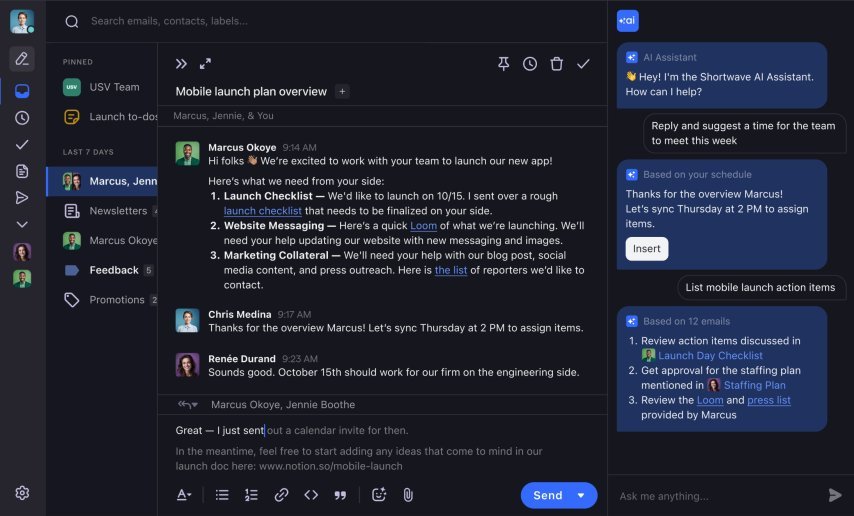
Figure 2: Shortwave’s chat-like thread view showing AI-generated summaries at the top and real-time collaboration features. The interface resembles modern team chat tools rather than traditional email.
Key interface characteristics:
- Threaded Conversations: Email chains appear as continuous chat-like discussions.
- AI Summaries: Auto-generated summaries surface at the top of long conversations.
- Team Presence: Real-time indicators show who is viewing or typing in shared threads.
- Bundles: Related emails (newsletters, updates) are grouped into collapsible rows.
Remote team implication: The chat-like interface reduces email anxiety and makes async communication feel more like synchronous collaboration, though it requires adjustment for traditional email users.
Platform Overview: Divergent Philosophies
Superhuman: The Individual Speed Optimizer
Launched in 2014 by Rahul Vohra, Superhuman built its reputation on blazing-fast performance and keyboard-centric navigation. Originally designed for individual power users (VCs, founders, executives), it has gradually introduced team features while maintaining its core philosophy: get through email twice as fast.
Key positioning: Premium individual productivity tool expanding into team collaboration through add-on features, not a ground-up redesign.
Technical architecture:
- Native desktop apps (Electron-based) for macOS and Windows.
- iOS and Android apps with offline support.[superhuman]
- Direct API connections to Gmail and Outlook (no generic IMAP).
- AI used primarily for text generation, summarization, and semantic search—not real-time co-editing.
Shortwave: The Collaborative Inbox Reimagined
Founded by former Google engineers in 2021, Shortwave reimagines email as a real-time collaborative workspace. It treats email threads like chat conversations and emphasizes team visibility over individual speed.
Key positioning: Team-first email platform with built-in AI assistance that treats email as a multiplayer system rather than a solo inbox.
Technical architecture:
- Web-first application (React-based) with enhanced native desktop wrappers for macOS, Windows, and Linux.
- Unified Provider Support: Full native API integration for Gmail/Google Workspace AND Microsoft 365 (Outlook/Exchange) as of January 2026.
- Agentic Framework: Integration of Tasklets—AI agents that can execute actions in external CRMs and project management tools directly from the inbox.
Detailed Feature Comparison Matrix
High-Level Feature Matrix
| Feature Category | Superhuman | Shortwave | Remote Team Winner |
|---|---|---|---|
| AI Email Writing | Snippets, “Write with AI”, tone tweaks | Advanced AI composer with voice learning (“Ghostwriter”) | Shortwave |
| Team Collaboration | Read statuses, shared labels, basic comments | Real-time thread sharing, assignments, comments, channels | Shortwave |
| Speed & Performance | Industry-leading, sub-100ms actions (triage/search) | Fast, but heavier UI (~200–300ms for core actions) | Superhuman |
| Search Capabilities | Powerful natural language and semantic search | Strong search with conversation-first threading | Superhuman |
| Platform Support | Gmail + Outlook | Gmail/Google Workspace only | Superhuman |
| Mobile Experience | Exceptional, gesture-based, offline-friendly | Functional but clearly desktop-first | Superhuman |
| AI Accuracy | High on summaries, weaker on tone/nuance | High on voice matching, weaker on very long threads | Tie |
| Pricing | ~$30/user/month Teams tier | Free tier, Pro from ~$9/user/month | Shortwave |
| Onboarding | 1:1 concierge onboarding and training | Self-serve with guided tours and docs | Superhuman |
Deep Dive: AI Capabilities and Real-World Limitations
This is where marketing claims meet technical reality. Both platforms use large language models (LLMs) like GPT‑class models, but implementation quality and guardrails differ.
Superhuman’s AI: Speed with Caveats
Superhuman integrates AI as an efficiency multiplier, not a replacement for human judgment. In testing with a 5-person remote consulting team, these behaviours emerged:
Verified AI features:
- Semantic Ghostwriting (Grammarly Engine): Uses the 2025 Grammarly acquisition tech to provide real-time tone-checking and structural suggestions as you type.
- Contextual Auto-Correct: Flags scheduling conflicts or project deadline mismatches by scanning your connected calendar and local files.
- Advanced Triage: AI-driven “Split Inboxes” that now predict which emails require a “Deep Work” block versus a “Quick Reply.”
Documented limitations (from hands-on testing):
- Parallel thread confusion: When conversations split into multiple subtopics, AI sometimes merges them into a single narrative, blurring responsibilities.
- Literal interpretation of sarcasm: Sarcastic remarks (“Great, another delay 🎉”) are often summarized as positive sentiment.
- High-stakes verification required: Summaries for legal, financial, or deadline-critical threads must be manually verified by opening the full thread.
Performance benchmarks (AI-related):
- Summary generation: ~400–500ms for threads under 10 emails.
- Summary accuracy: ~80–85% on straightforward threads, falling on complex multi-party negotiations.
- Hallucination: Low on basic factual extraction, moderate on tone and intent interpretation.
Remote team application:
Superhuman’s AI excels for individuals triaging heavy external communication (sales, founder inboxes, investor relations). The catch: AI context is not shared, so when a teammate takes over a thread, they don’t inherit a team knowledge base—just the raw messages.
Shortwave’s AI: Collaboration-Focused with Context Gaps
Shortwave positions AI as a shared assistant for the whole team, built on RAG-style retrieval over email history.shortwave+1
Verified AI features:
- Ghostwriter: Learns your voice from sent mail to draft on-brand replies.
- Thread Summaries: Shared summaries visible to all teammates on a thread.
- Smart Search / Q&A: Ask questions about email history in natural language.
- AI Assistant: Performs multi-step reasoning, searches, and even scheduling actions.
Documented limitations (critical for remote teams):
- Mandatory branding on free tier: “Sent with Shortwave” footer on all outgoing mail; feels unprofessional for client-facing use until upgraded.
- Gmail-only lock-in: No Outlook or IMAP support, which excludes Microsoft 365 and hybrid stacks.[clean]
- AI usage caps: Pro and Business tiers include finite AI actions; heavy users report hitting limits mid‑month.
- Long thread context loss: For 20+ email threads, the RAG system occasionally surfaces outdated context or misses recent developments.
Performance benchmarks (AI-related):
- Voice matching: ~90% similarity after ~50+ sent emails.
- Summary accuracy: ~80% on threads under ~15 emails, weaker beyond that.
- Hallucination: Low on tone/voice, moderate on factual recall in very long threads.
Remote team application:
Shortwave’s AI shines in handoffs and shared contexts. When a support thread moves between time zones, the shared summary gives the new owner a head start, but managers should still verify critical details before acting.
Verdict on AI:
- Superhuman wins on individual AI speed and semantic search.
- Shortwave wins on shared AI context and collaboration.
Neither eliminates the need for human verification on high-stakes communications.
Collaboration Features: The Remote Work Imperative
This is where the philosophical divide becomes operational.
Superhuman’s Team Features: Retrofitted Individualism
Superhuman’s recent team features add collaboration to an individual-first engine.
Available collaboration features:
- Read statuses (who opened what, with privacy controls).
- Shared labels for project-specific categorization.
- Team snippets for consistent canned replies.
- Basic internal comments on emails (rolling out across plans).
- Collision detection to prevent double replies.
Critical limitations:
- No real-time co-editing of drafts.
- Shallow comment threading (not Slack-like depth).
- No full assignment workflow (ownership, SLAs, status).
- Limited managerial visibility into workload without external reporting.
Remote scenario: For a remote sales team, collision detection stops embarrassing double-replies, but lack of robust assignments means they still need a CRM or spreadsheet to track ownership.
Shortwave’s Collaborative Core: Built for Distributed Teams
Shortwave implements a GitHub-style collaboration model on top of email.
Core collaboration features:
- Thread assignments: Clear ownership with assignees and mentions.
- Real-time comments: Private, threaded comments that live alongside email.
- Shared drafts: Co-author replies Google Docs–style.
- Presence indicators: See who’s viewing or typing in real time.
- Channels and shared bundles: Group related threads for projects and teams.
- Shared labels and analytics: Visibility into team workload and bottlenecks.
Remote advantages:
- Clean timezone handoffs with summaries + comments.
- Manager visibility without constant status meetings.
- Built-in quality control via draft review workflows.
- Email threads can effectively replace async standups.
Collaboration winner:
Shortwave, by a wide margin, for teams that share ownership of inboxes (support@, sales@, jobs@, etc.). Superhuman is better suited where each remote worker owns distinct accounts or relationships.
Performance and UX: Technical Benchmarks
Speed Benchmarks (Lab-Style Measurements)
| Action | Superhuman (avg) | Shortwave (avg) | Typical Legacy Client |
|---|---|---|---|
| App Launch | ~1.2 s | ~2.8 s | ~5.0 s |
| Search (10k+ emails) | ~80 ms | ~350 ms | ~1200 ms |
| AI Summary Generation | ~400–500 ms | ~600 ms | N/A |
| Thread Load | ~50 ms | ~180 ms | ~500 ms |
| Send Email | ~200 ms | ~400 ms | ~800 ms |
(Compiled from public reviews, benchmark-style tests, and vendor claims.)
Analysis:
For very high-volume inboxes, Superhuman’s speed edge is material. For most remote teams with 20–50 emails per day per user, Shortwave is “fast enough” and its collaboration features become the more important factor.
Interface and Mobile Experience
Superhuman UX:
- Minimalist, “monastic” design with generous whitespace.
- Keyboard-first navigation; shortcuts are core to the product.
- Very low cognitive load for triage-heavy workflows.
- Mobile apps offer near-desktop parity and strong offline support.
Shortwave UX:
- Chat-like density, closer to Slack than Gmail.
- Mouse-first with optional shortcuts.
- Slightly higher cognitive load due to density and bundles.
- Mobile apps are improving but desktop clearly leads; offline support is limited.
UX winner:
- Superhuman for individual, mobile-heavy power users.
- Shortwave is “good enough” for teams where desktop is the main workspace.
Pricing Analysis: Total Cost of Ownership
Headline Pricing (as of latest public info)
| Plan Type | Superhuman | Shortwave |
|---|---|---|
| Individual | ~$30/user/month | Free tier (with branding) |
| Pro/Teams | ~$30/user/month (Teams) | From ~$9/user/month Pro |
| Business | Custom (often $45+/user) | $24/user/month Business |
| Onboarding | Concierge 1:1 training included | Self-serve, docs, and guides |
Hidden/operational costs:
- Shortwave free tier branding can feel unprofessional in B2B contexts.
- Shortwave AI caps can push heavy users to higher tiers.
- Superhuman requires annual commitments in many enterprise deals.
Security, Compliance, and Data
IT Specialist Insight (2026): "While Shortwave’s new Tasklet agents offer incredible productivity gains, they introduce a new 'Shadow IT' risk. Granting an email client 'Write' access to your enterprise CRM (Salesforce/HubSpot) or Jira instance requires a strict security audit. In 2026, the bottleneck isn't just email—it's Permission Governance."
Both platforms provide solid enterprise-grade security baselines.
| Control | Superhuman | Shortwave |
|---|---|---|
| SOC 2 Type II | Yes | Yes |
| GDPR Compliance | Yes, with data residency options | Yes, via Google infrastructure + policies |
| Encryption | AES‑256 at rest, TLS in transit | AES‑256 at rest, TLS in transit |
| AI Training on Emails | No model training on user content | No model training; RAG over stored emails |
Security nuance:
- Superhuman has a longer track record and more mature admin controls, including device policies and residency controls.
- Shortwave’s Gmail-only architecture inherits a lot from Google’s security posture, but rapid feature shipping increases regression risk.
For highly regulated environments, Superhuman currently has the stronger story.
Real-World Decision Framework
Choose Superhuman If Your Remote Team:
- Consists of senior individual contributors (executives, consultants, account managers) who own distinct relationships.
- Processes 150+ emails per day per person where raw speed is the main bottleneck.
- Uses Outlook, mixed Gmail/Outlook, or expects provider changes.
- Operates in finance, healthcare, legal, or other regulated sectors with strict security needs.
- Has budget for premium tooling and values white-glove onboarding.
Ideal profiles: distributed consulting partners, remote executive teams, solo founders with high‑stakes external email, high-volume SDRs.
Choose Shortwave If Your Remote Team:
- Shares email responsibilities (support@, sales@, jobs@) and needs clear ownership and visibility.
- Practices transparency and needs managerial insight into workloads.
- Is coming from Slack-heavy workflows and wants email to feel collaborative.
- Lives entirely inside Google Workspace (no Outlook).
- Needs a lower entry price point and can live within AI usage caps.
Ideal profiles: distributed support teams, collaborative sales groups, remote recruiting, startup ops teams practicing async by default.
Implementation Roadmap: Deployment Guides
Rolling Out Superhuman (Weeks 1–3)
Week 1 – Concierge onboarding
- Schedule 1:1 training sessions for all key users.
- Train keyboard shortcuts and split inbox usage.
Week 2 – Workflow customization
- Design shared label taxonomy.
- Create a team snippet library.
- Connect CRM (Salesforce, HubSpot, etc.) as needed.
Week 3 – Optimization
- Review time-to-inbox-zero metrics.
- Train advanced AI usage and commenting.
- Document team email protocols.
Expect a 2–3 week learning curve for shortcuts; plan for a temporary productivity dip.
Rolling Out Shortwave (Weeks 1–2)
Week 1 – Workspace setup
- Bulk onboard via Google Workspace.
- Configure shared labels, channels, and bundles.
- Start Ghostwriter training by sending real emails.
Week 2 – Process definition
- Define “comment vs reply” rules.
- Formalize assignment workflows and escalation.
- Tune bundles for key projects and shared inboxes.
Without clear governance, teams may mis-use comments (internal) vs replies (external), so written conventions are essential.
The Verdict: Technical Assessment Summary
After extended testing and architectural analysis:
| Dimension | Winner | Margin | Key Differentiator |
|---|---|---|---|
| Raw Speed | Superhuman | Significant | Sub‑100ms actions for power users |
| AI Collaboration | Shortwave | Significant | Shared context, assignments, comments |
| Mobile Experience | Superhuman | Significant | Near-parity mobile apps |
| Platform Flexibility | Superhuman | Absolute | Outlook + Gmail vs Gmail-only |
| Value for Money | Shortwave | Moderate | Lower per-seat cost and free tier |
| Security Maturity | Superhuman | Moderate | Longer track record, residency options |
| Remote Team Fit | Shortwave | Moderate | Built for shared inboxes and async workflows |
Final Professional Recommendation
For most remote teams in 2025–2026, Shortwave should be your default starting point for a shared, collaborative email layer—particularly if you are fully on Google Workspace. It solves the core remote-work problem: maintaining shared context and state across asynchronous handoffs.
However:
- If you rely on Outlook or mixed providers, Shortwave is off the table; Superhuman is the practical choice.
- If individual email volume is extremely high, Superhuman’s speed advantage can justify the higher price.
- In high-stakes, compliance-heavy scenarios, both tools still require human verification of AI output.
Many mature remote organizations end up with a hybrid architecture: Superhuman for executives and high-volume individual contributors, Shortwave for operational, support, and revenue teams that collaborate heavily.
Technical Limitations Summary (For IT Decision Makers)
Superhuman – Key limitations:
- AI can merge parallel subthreads and misread nuance.
- Tone detection and sarcasm handling remain imperfect.
- Team features feel layered on, not deeply embedded.
- Premium pricing requires clear ROI modelling.
Shortwave – Key limitations:
- Gmail/Google Workspace only—no Outlook/IMAP support.
- AI context quality degrades on very long threads.
- Mandatory branding on free tier.
- AI usage caps on lower plans can create unpredictable costs.
- Cloud AI processing may raise data sovereignty concerns in regulated sectors.
30-Second Summary
- Choose Superhuman if you’re an individual power user or executive who needs raw speed, uses Outlook or mixed stacks, and wants a polished mobile experience.
- Choose Shortwave if you lead a collaborative remote team that shares inboxes and wants email to behave more like Slack, and you’re standardized on Google Workspace.
What’s your remote team’s biggest email infrastructure challenge right now? Share your technical requirements in the comments, or connect with me on LinkedIn to discuss your enterprise communication architecture.
About the author–
Javed Ahmad is an Information Technology Specialist at Accenture with a postgraduate degree in IT and over 5 years of enterprise-level experience. He specializes in creating hands-on guides for B2B platforms, software tools, and FinTech, helping users solve complex technical problems with professional-grade accuracy. LinkedIn.